

How to set up automatic tasks for services
On the service settings page, you can set up a feature of generating tasks once you create or receive an order. These tasks will appear in the Hotel Management System automatically. To activate this feature, you only need to configure it once.
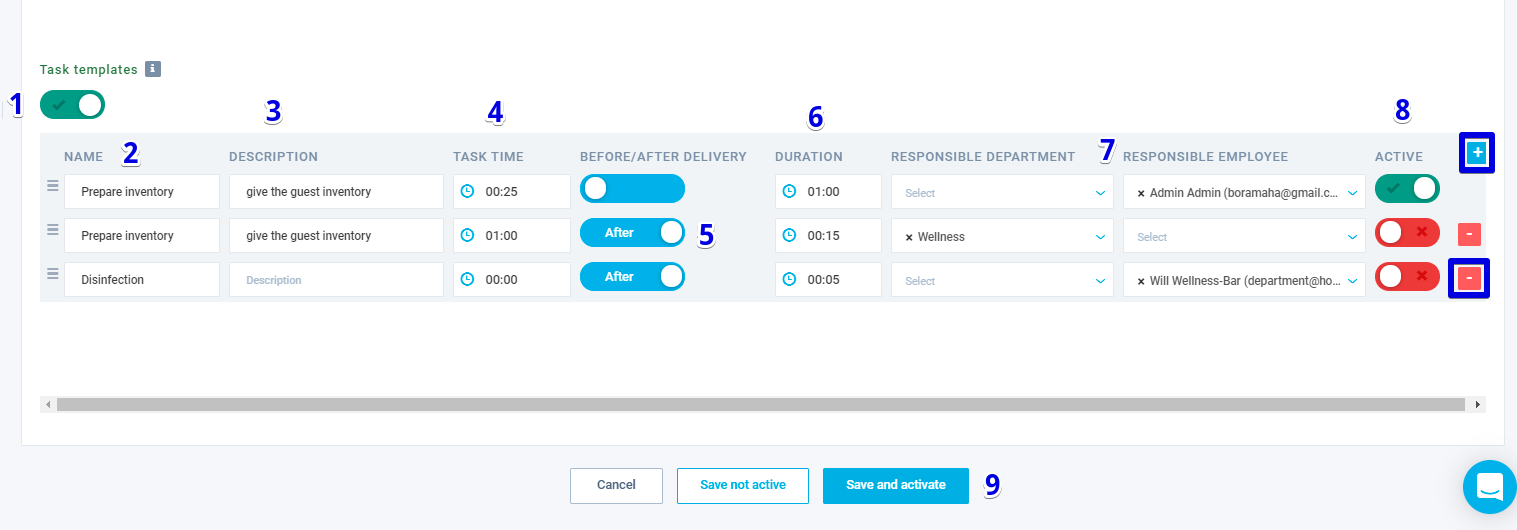
- On the service edit page, enable the "Task templates" toggle;
- Enter the name of the task in the “Name” field;
- If necessary, enter a description of the task in the “Description” field;
- Specify the task notification time in the “Task time” field;
- If necessary, switch toggle before/after delivery;
- Select duration in the “Duration” field;
- From the drop-down list, select the responsible department or a particular employee who is responsible for completing the task;
- Activate function by switching the toggle;
- Save changes.
To create additional tasks, click on the "+" button and fill in the fields. To delete new options created by you, use the “-” button.
Author:

