

How to set up DATEV export integration
DATEV is an export format used to extract your financial data from Mollie to help with your accounting. Using this format will enable you to import your transaction details into your DATEV-compatible accounting system more easily.
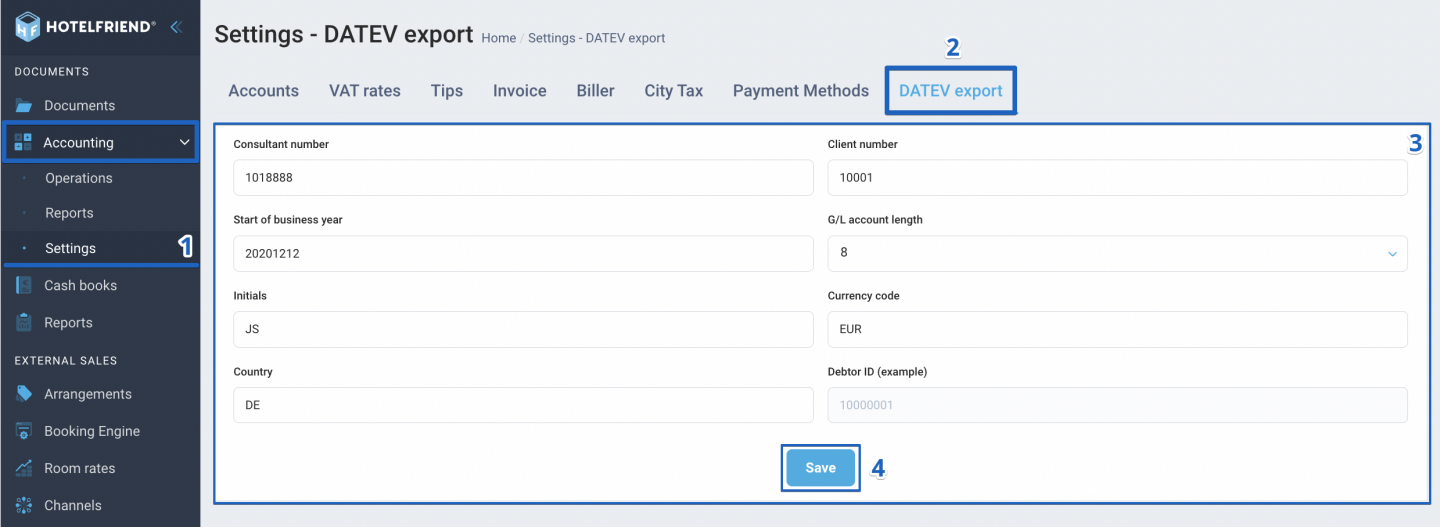
Follow the steps below to set up the DATEV export in HotelFriend:
- In the menu on the left, go to Accounting and select Settings.
- Select the DATEV export tab.
- Fill in the following fields based on the details from your DATEV system:
- Consultant number: Your DATEV consultant ID (Data range: 1001–9999999)
- Start of business year: Date your fiscal year begins (Format: YYYYMMDD)
- Initials: Editor’s initials (Example: “JS” for John Smith)
- Country: Country code (Example: DE for Germany)
- Client number: Your client ID in DATEV (Data range: 1–99999)
- G/L account length: Length of G/L account numbers (Must match configuration in the DATEV import setup)
- Currency code: ISO currency code (Default: EUR)
- Debtor ID: Unique customer identifier (example 10000001)
- Click the Save button to apply your settings.
If you don’t see this tab, please contact the HotelFriend sales team to enable this feature in your contract.
Author:

