

The Accounting Report
The Accounting Report is a vital component of financial management, which provides comprehensive information on the profit data for a selected period. This article will explain the various components of the report and how to interpret the information featured.
How to create an Accounting Report
To generate this report, go to Reports > Online Reports > Finacial and select the Accounting Report in the drop-down menu. Here you can select the specific day or period for which you want to create the report.
Check out this step-by-step guide for further instructions: How to create quick reports in real-time.
What does an Accounting Report include?
The Accounting Report is divided into different components that display detailed information about the financial transactions of the business. These components are:
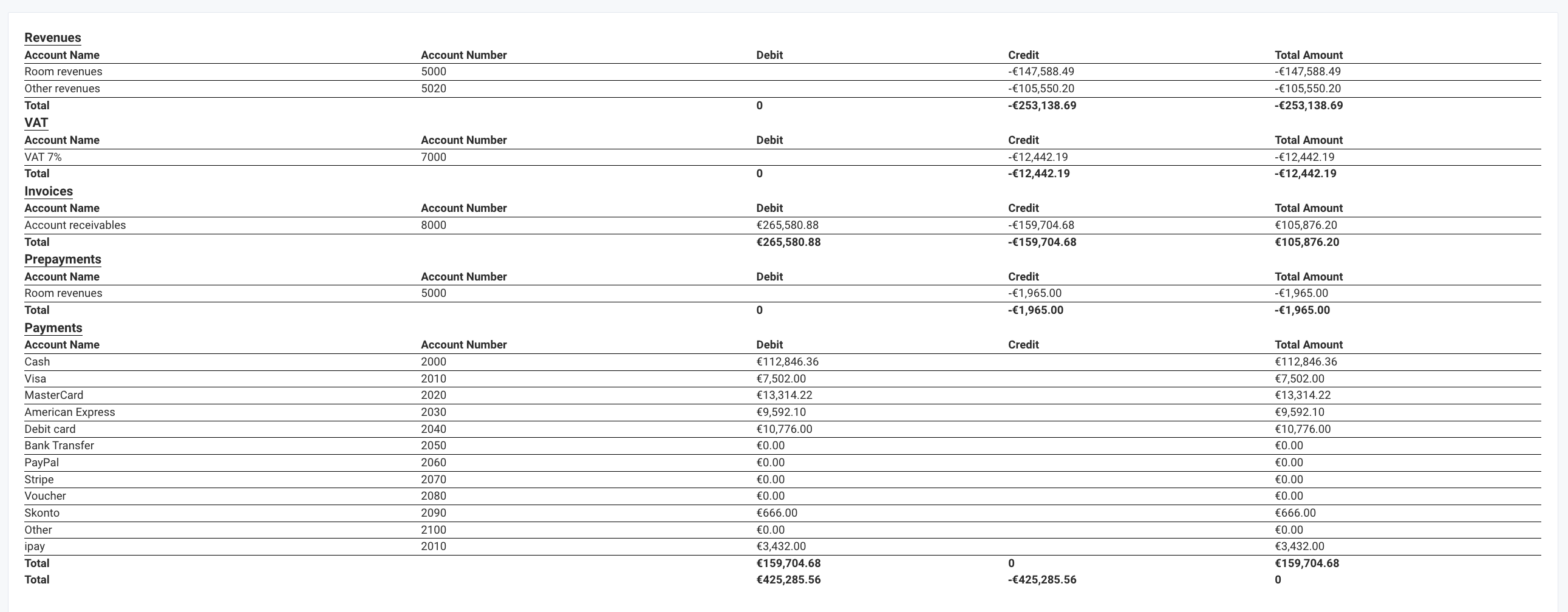
- Account Name: The Account Name refers to the name of each account number that has been created in the system. The Account Name typically represents a category of transactions, such as room revenues, account receivables, etc.
- Total: The Total column displays the total amount for each of the existing account numbers and the Total for all accounts.
- Account Number: The Account Number is a unique identifier assigned to each account. It is used to track the transactions associated with that account.
- Debit/Credit: The Debit and Credit columns show the amount of money that has been debited or credited to each account. These columns are used to calculate the account balance.
- Total Amount: The Total Amount column shows the net profit or loss for the selected period. The total amount of profit can be displayed both with + and with - depending on the financial situation of the business.
- VAT: The VAT column shows the amount of tax that has been charged and the percentage of the corresponding tax.
- Invoices: The Invoices column shows the profit earned from created invoices.
- Prepayments: The Prepayments column shows the profit earned from received prepayments
- Payments: The Payments column shows the profit earned from received payments for each of the payment methods.
In conclusion, the Accounting Report is an essential tool that helps hospitality businesses keep track of their financial activities and improve performance.

