

Invoices, Bookings and Taxes – FAQ & Solutions
Quick Overview
Most discrepancies with invoices, bookings, or taxes are caused by:
- Settings (tax rates, prices, invoice logic)
- Subsequent changes to bookings
- Prepayments or partial cancellations
The following points help you check and solve the problem yourself.
Invoices
Why is my invoice incorrect?
Please check first:
- Was the invoice created from the correct booking?
- Are all services listed correctly?
- Was the invoice newly created or only edited?
Note: Changes to bookings do not automatically affect existing invoices.
How do I create a correct invoice?
- Open the desired booking
- Create the invoice directly from the booking
- Check amounts, services, and taxes in the preview
- Finalize the invoice

The preview always shows the current status.
Prepayments and Refunds
- Prepayments are booked separately
- They must be actively offset against the invoice
- Refunds are only possible if the payment status is set correctly
Bookings
Why does the invoice not match the booking?
Common reasons:
- Room changes or changes after the first invoice was issued
- Partial cancellations
- Multiple trips or rooms under one booking
Recommendation: Delete the invoice and recreate it once the booking is final.

Booking cannot be completed
Please check:
- Are all payments recorded correctly?
- Are there open services?
- Is the booking status complete?
Taxes and VAT
Which tax rates are used?
- Tax rates are tied to rooms, rates, or additional services
- The tax rate at the time of booking is decisive
- Changes to taxes do not apply retroactively
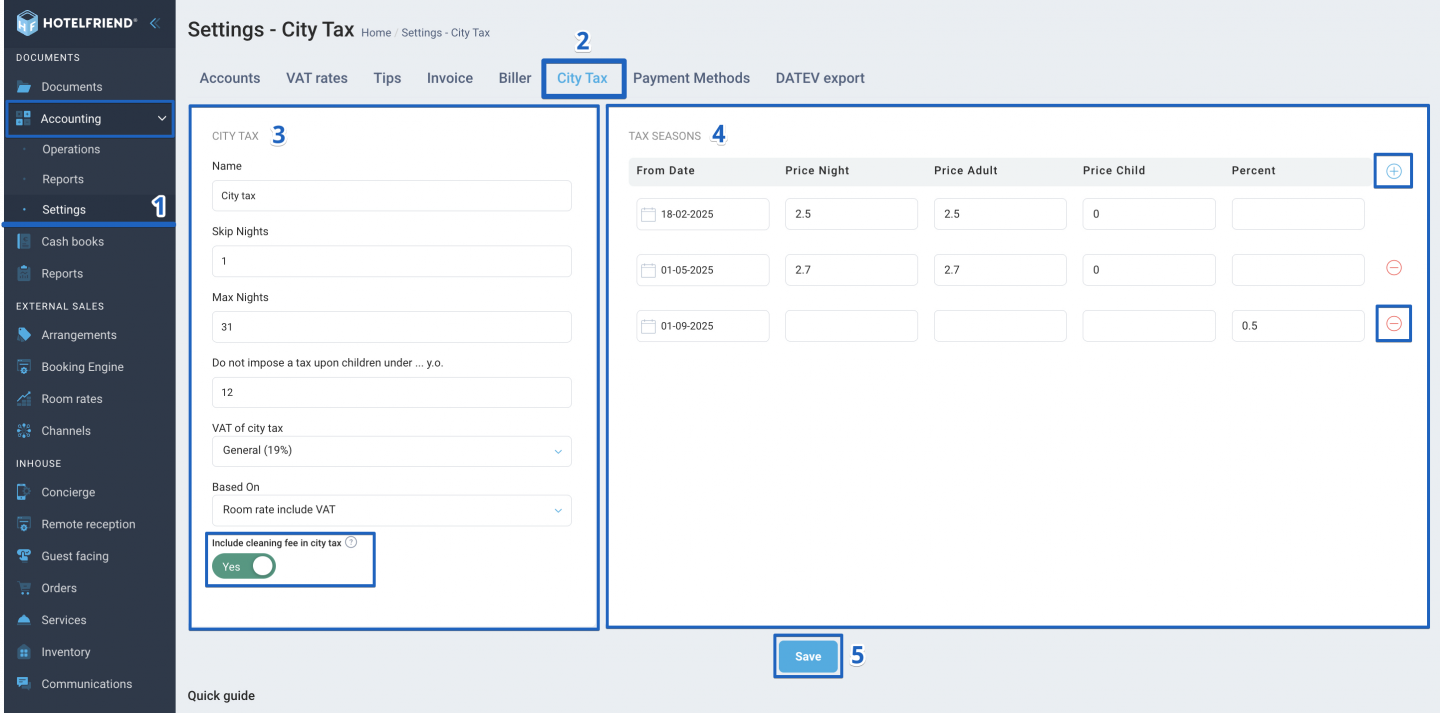
Note: The screenshot below shows where VAT rates are configured in HotelFriend. The numbered markers highlight key areas related to VAT setup and assignment.
Why does the VAT differ?
Possible causes:
- Different tax rates per service
- Gross vs. net price logic
- Rounding differences with multiple items
Small deviations can occur due to rounding logic.
Rounding
- Rounding occurs per position, not just on the total sum
- Combinations of nights, additional services, and taxes can cause small deviations
Checklist before contacting support
Please check before submitting a request:
- Invoice was recreated
- Booking is final and correct
- Tax rates are assigned correctly
- Prepayments are taken into account
When to contact support?
Please contact support if:
- Amounts differ significantly
- Taxes are obviously not applied correctly
- Payments or refunds are blocked
Please have ready:
- Invoice number
- Booking number
- Brief description of the issue
Summary
- Most invoice and tax questions can be resolved via settings or recreation
- Booking changes after invoicing are the most common cause of discrepancies
- A clean check saves time and inquiries
Further Help
Here you can find detailed guides from our Help Center:
Author:

