
Product Updates v4.39 & v4.40: New integration with Betterspace, Child Meal Prices, DATEV ZIP, Resource Planner & Scheduled Prepayments
Discover HotelFriend v4.39 and v4.40 with safer guest sign-in, meal prices per child age group, DATEV receipt ZIP, Betterspace integration, VAT split in the Financial report, Resource Planner week and month views, and scheduled prepayments.
Nov 13, 2026 7:58 AM
What’s new in v4.39 and v4.40: safer guest sign-in and online booking, meal prices per child age group, a DATEV export with invoice PDFs, a Betterspace integration, a VAT split per rate in the Financial report, week and month views in the Resource Planner, and prepayments that are charged on schedule.
Product Updates v4.39 and v4.40 bring nineteen improvements across guest security, the front desk, integrations, reporting, resource planning and accounting. Many of them come directly from hotels, seminar venues and campuses using HotelFriend every day.
Integrations: DATEV, Betterspace, Channex, Kiosk API
1. New Betterspace Integration
For hotels with Betterspace smart-room hardware, every new, changed or cancelled reservation is sent to Betterspace as an occupancy. Its automation, for example heating, then follows real occupancy.
- Rooms are mapped to Betterspace spaces
- Manual Betterspace occupancies that overlap are reported, not overwritten
Rooms are heated or cooled according to the actual booking situation, and manual entries on the Betterspace side are never lost.
2. Hotelplatform (Key & Card): door locks ready for Live. Hotfix 4.39.3
Go to Property → Integrations → Hotelplatform → Manage Door Lock. The provider can now be selected when adding a Controller (Encoder) or Unit. Saving a controller displays a confirmation or a translated error message. Hotelplatform errors are shown as returned by the provider instead of being replaced with “Key validation failed”. The Key & Card auth server can be configured for Live, and each hotel uses its own access token.
Where: Property → Integrations → Hotelplatform → Manage Door Lock
- Provider selection available in Add Controller (Encoder) and Add Unit
- Controller saving displays a confirmation or translated error
- Original Hotelplatform error messages are preserved
- Key & Card auth server is configurable for Live
- Each hotel uses its own access token
Only hotels that connect the integration are affected.
3. DATEV export: receipt ZIP with the invoice PDFs
The DATEV export can be downloaded as a ZIP with all invoice PDFs of the export period, linked to their postings. The tax advisor imports the CSV into DATEV Rechnungswesen as before and uploads the ZIP to DATEV Unternehmen online.
- Clicking a posting opens the matching invoice
- The hotel does not need to send documents separately
- Existing export types are unchanged
Month-end with the tax advisor gets faster, with no follow-up questions about missing receipts.
4. Channex: the hotel’s changes survive a Booking.com modification
When Booking.com modifies a booking, Channex re-creates it, and earlier the hotel’s changes were lost. Each re-created booking now takes over the hotel’s changes from the booking of the same room. This applies to all Channex hotels.
Where: Channel manager (Channex) → modified OTA bookings
- Kept: room, room type, split stay, room lock, dates, price, rate and occupancy
- Fields the hotel did not change take the OTA’s value, as before
A guest changing a booking on Booking.com no longer undoes the work of reception.
5. Kiosk API: key-card encoding documented for third-party kiosks
Kiosk API documentation
- The key-card encoding call is now published, with inputs, answers, errors and supported lock systems (currently Salto SVN)
- The contract with the card dispenser is documented
Kiosk vendors can now encode and dispense a room key card using the documentation alone, with no individual integration support needed.
Security
6. Security patch: guest sign-in and online booking are better protected
Guests who sign in with their reservation code now also enter their last name, or the company name when a company pays. Repeated wrong attempts are limited. Online bookings also always follow the hotel’s own settings.
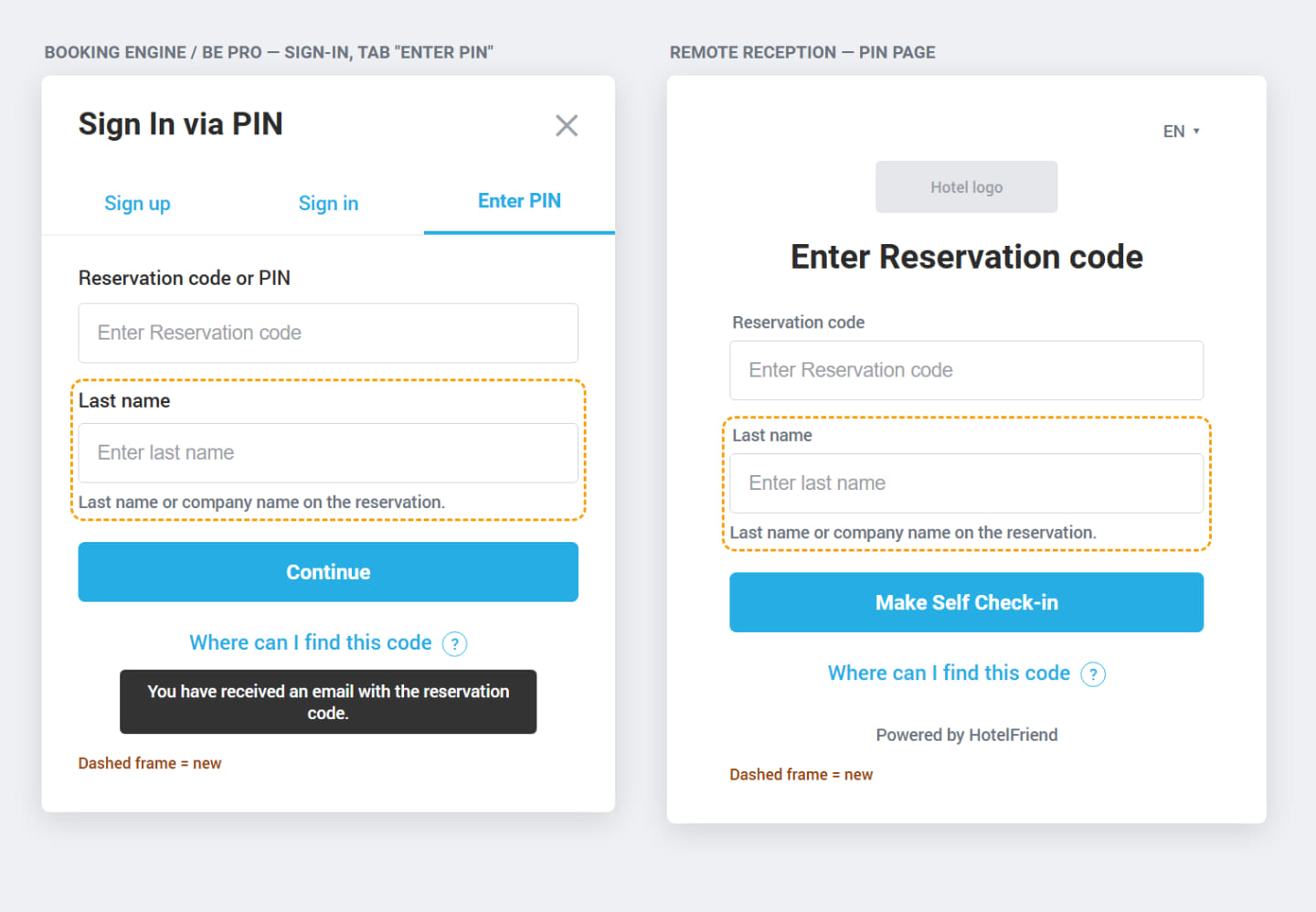
Where: Booking Engine / BE Pro / Remote Reception / Guest App → sign-in with the reservation code · online booking
- Rooms and deals can be booked only through the Booking Engine and BE Pro, with the hotel’s required guest fields
- Bookings are possible only on rates whose Source allows the Booking Engine
- Rates that require full payment at booking can only be booked with that payment
- Door-lock PIN codes are generated more securely
A reservation code alone no longer opens a booking, and online booking can no longer get around the hotel’s rate rules. Guests see one extra field, while the hotel gets better protection of guest data and rates.
7. OTA virtual card payments are processed correctly through HotelFriend Payments.
Open the reservation and charge the OTA virtual card. The payment is now sent to HotelFriend Payments as a stored-card transaction, rather than a mail/phone order, in accordance with HotelFriend Payments' requirements.
Where: Reservation card → Payment with OTA virtual card (Channex → PCI Booking)
- OTA virtual card payments are processed as stored-card transactions
- Regular guest card payments remain unchanged
- Live use requires HotelFriend Payments to activate the option on their side
This ensures OTA virtual card payments follow the required processing method.
Reservations & Front Desk
8. Meal prices per child age group
Each meal can have a price per child age group, set up in Check-in & Age. Adults are charged the adult price and each child their age group’s price. If the group has no price, or the age is unknown, the default child price applies.
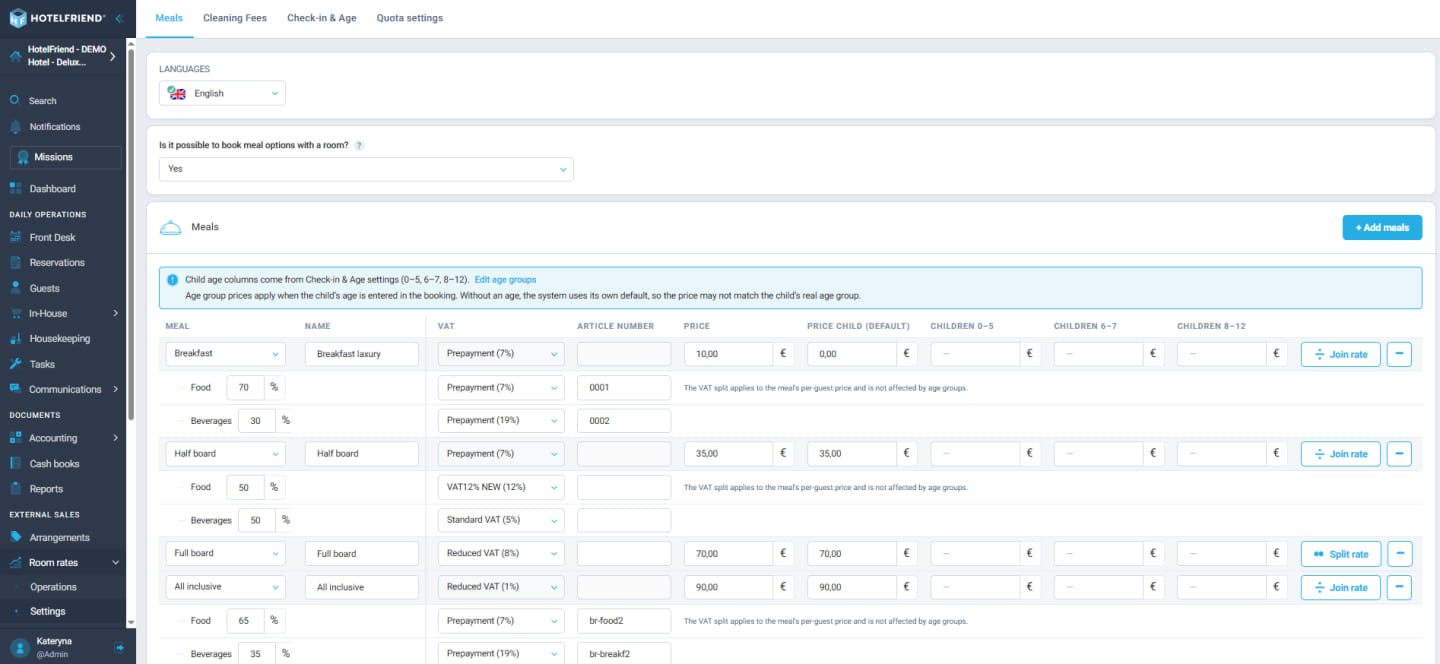
Where: Room rates → Settings → Meals · Reservations → Add / edit booking · Booking Engine
- Works at reception and in the Booking Engine
- Hotels without age groups see no change
- Meal lines per guest group on the invoice follow in a later release
- Requires permission: Reservations Management, to edit Meals settings
Families with children of different ages are charged correctly and automatically, with no manual corrections.
9. Improved Company Payer Management
Change payer: company details shown and editable.
Open the reservation, choose Actions → Change payer and set the toggle to Company. The modal now shows the selected company’s details, pre-filled from the company profile. Changes are saved to the profile and the company becomes the payer.
Where: Reservation card → Actions → Change payer → Company
- Shown: name, contact data, address, legal and bank details
- Guest mode is unchanged
Staff can check and correct company data without leaving the reservation.
10. Simplified Service Ordering Within Reservations
Ordering services inside a booking works like the standard Add Order
The order menu inside a booking now uses the same window as In-House → Add Order. Available services are on the left and selected services on the right. Delivery time is preset to the check-in date.
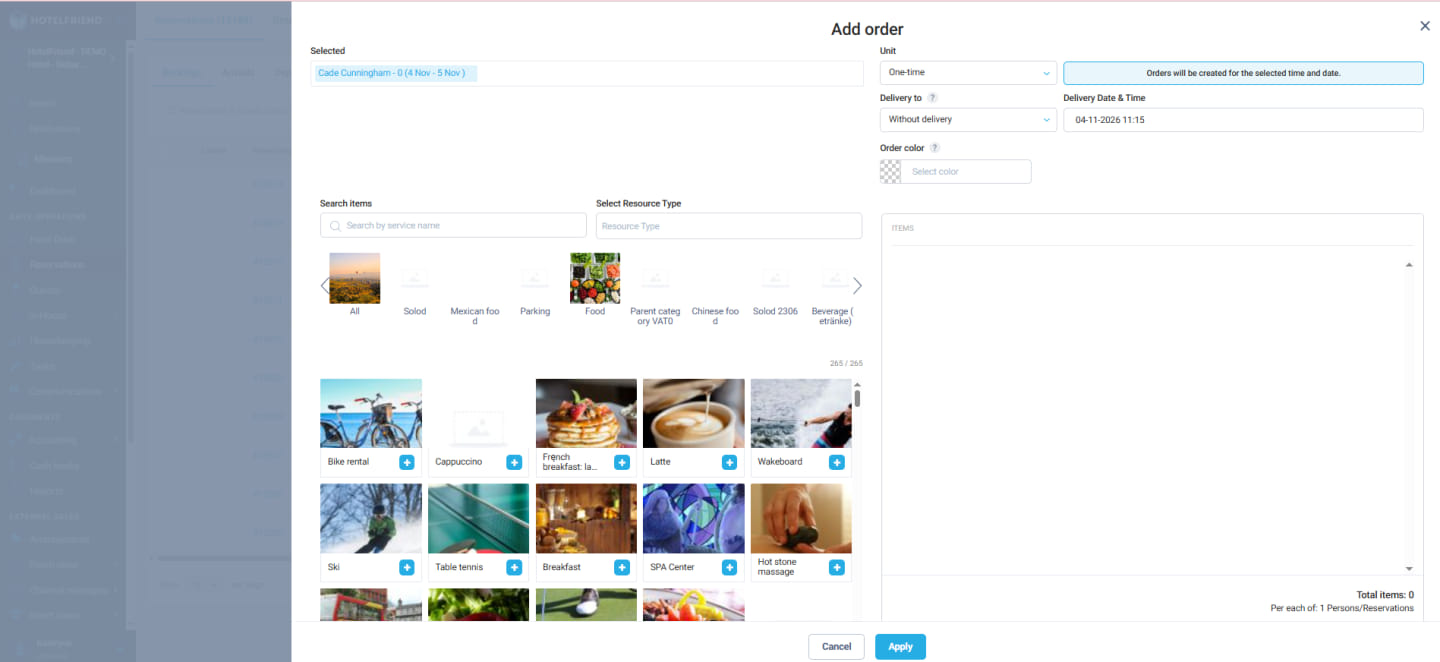
Where: Reservations → Add / edit booking → Orders
- Resource, options, discount, duration and order comment are available
- On the Confirm step, added services show in a compact row with their count and total price
- The row expands to one line per service with its price
One familiar window means nothing is missing in the booking flow and staff learn only one order screen.
11. More Sorting Options in the Reservations List
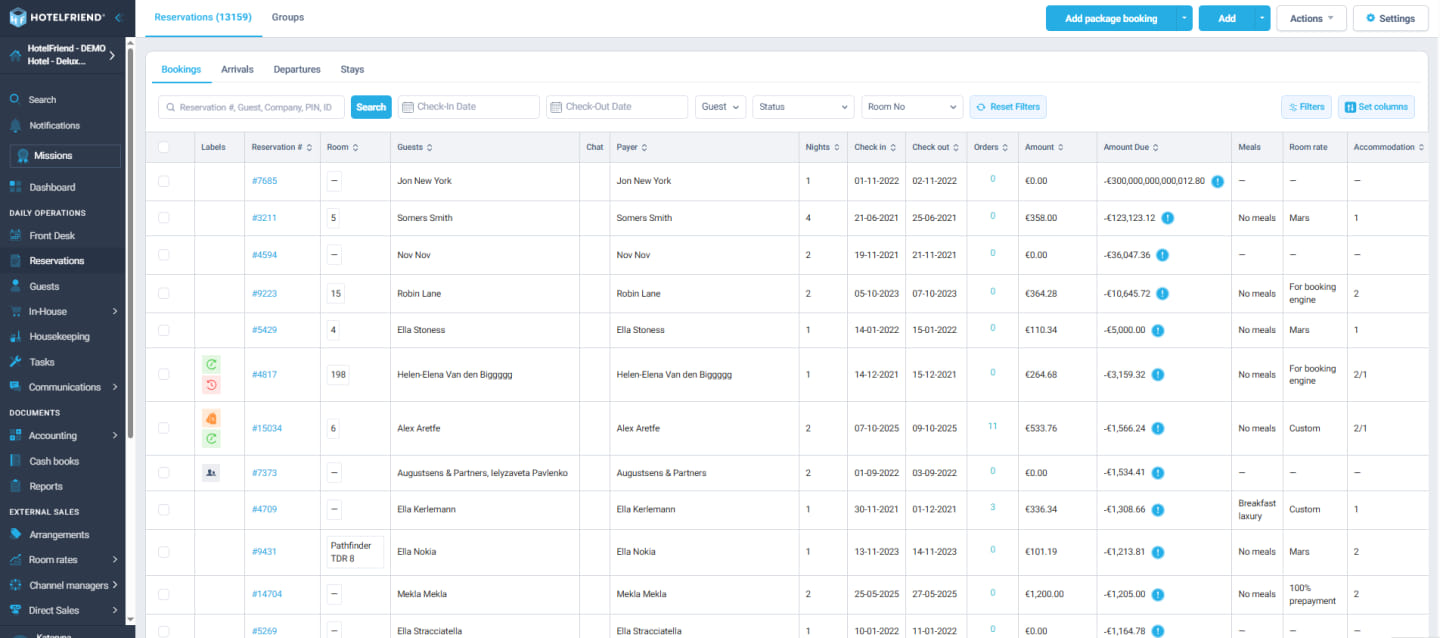
Finding specific reservations is now more convenient. Eight additional columns can be sorted in ascending and descending order:
- Room
- Guests
- Payer
- Nights
- Orders
- Amount
- Amount due
- Accommodation
Where: Reservations → list → click a column header
- Rooms with several guests or rooms sort by the first one
- Amount and Amount due sort by the value shown in the cell
- Filters, pagination, custom tabs and the Groups tab keep working
Finding the largest open balances or the longest stays takes one click. Requested by Montana Parkhotel Marl.
Reports & Guests
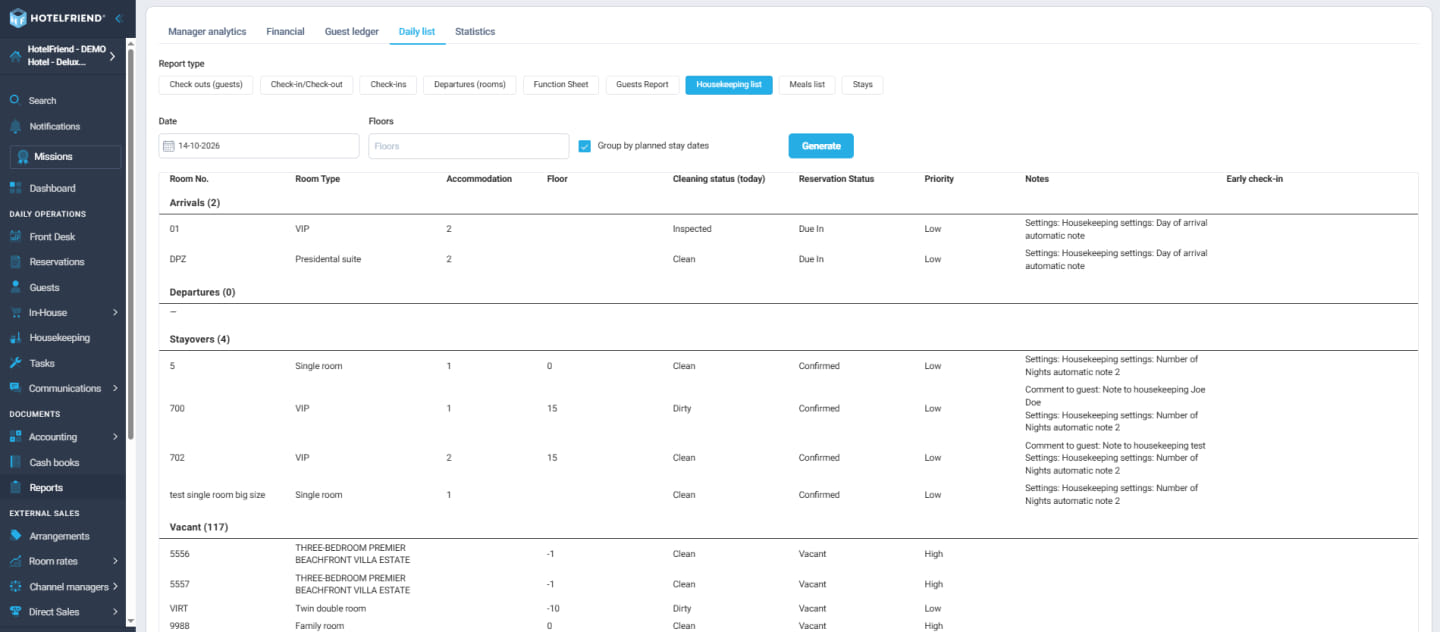
Another improvement in v4.39 is the Housekeeping report for future dates. With the optional planned-stay mode, rooms can be grouped into Arrivals, Departures, Stayovers and Vacant based on the selected date, helping housekeeping teams plan ahead.
12. VAT Breakdown in the Financial Report
VAT split per rate for every section
Under the Rooms, Options, Arrangements and Services totals, the report shows one line per VAT rate with net and VAT amounts (“thereof at X % VAT”). The Total block adds a VAT-per-rate summary.
Where: Reports → Online reports → Financial report
- The rates come from the hotel’s own settings
- PDF and Excel exports include the breakdown
The VAT figures accounting needs are in the report itself, so nobody has to recalculate them.
Resources, Events & Services
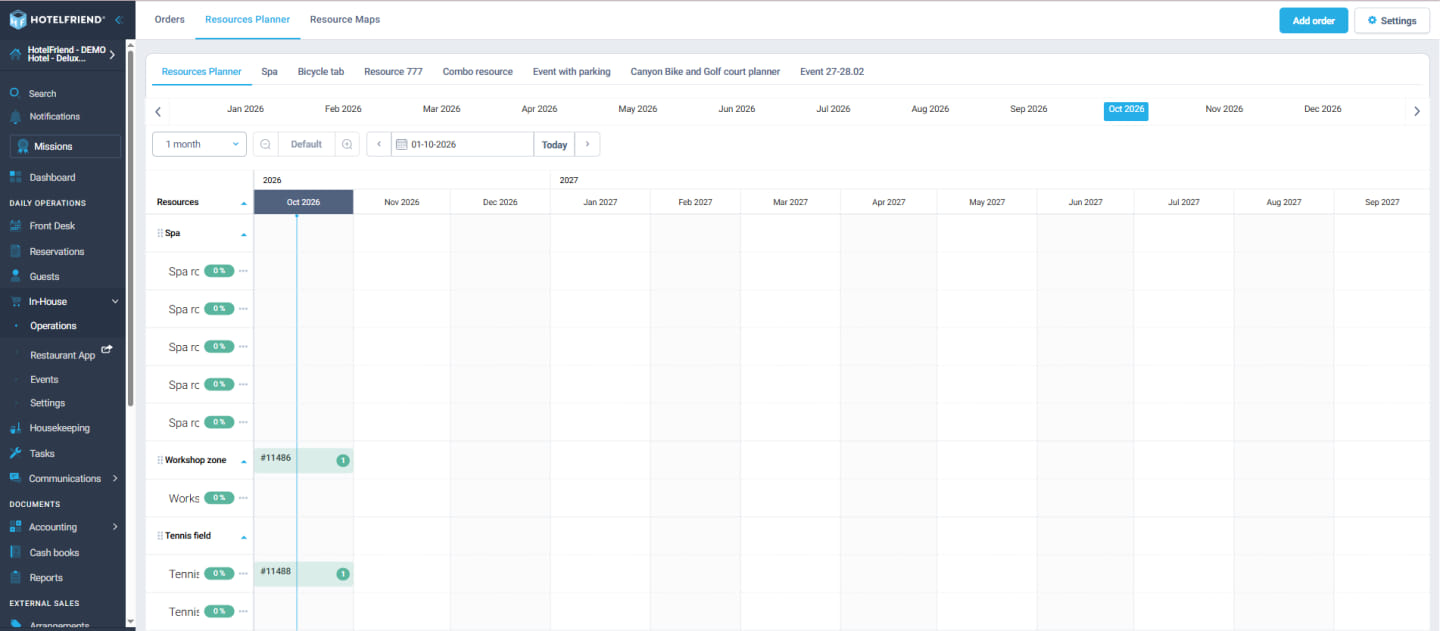
The Resource Planner also supports week and month time steps, making it easier to review resource occupancy across a whole quarter or season on one screen.
13. Cleaner Event PDF Exports
The exported event PDF has a cleaner layout:
- Columns are aligned
- The event schedule is no longer covered by long header details
- Header titles (Dates, Description, …) stand out
- The created date is hidden
The exported event PDF now looks more professional and is easier to read, so it can go straight to clients and teams.
14. Service preparation time is enforced when guests order
A preparation time set on a service, for example 72 hours, is now respected.
Guests can only choose delivery times after that period. Earlier times are unavailable in the Booking Engine, BE Pro and Remote Reception, and the system rejects them too.
Where: In-House → Settings → Services → Time of delivery → Preparation time
- Without a preparation time nothing changes
- Existing orders are not touched
15. Further Improvements to Events and Guest Management
Several small improvements:
- Catalogue search: from an event programme line (Events → + Add order), search finds items of every type, with removable filter chips and “Search in all items” on an empty result
- Guests list: counts bookings and nights for guests who stay as additional guests, not only as main guest
- Labels: the reservation dialog button now reads “Preview email template”, and the remove-item button of the order modal is translated
16. Employee-Based Task Filtering
In the Tasks grid, tasks can be filtered by the assigned employee, alone or combined with the Department filter. Clearing the filters shows all tasks again.
Where: Task Management → Tasks grid → Employee filter
Invoicing, Payments & Accounting
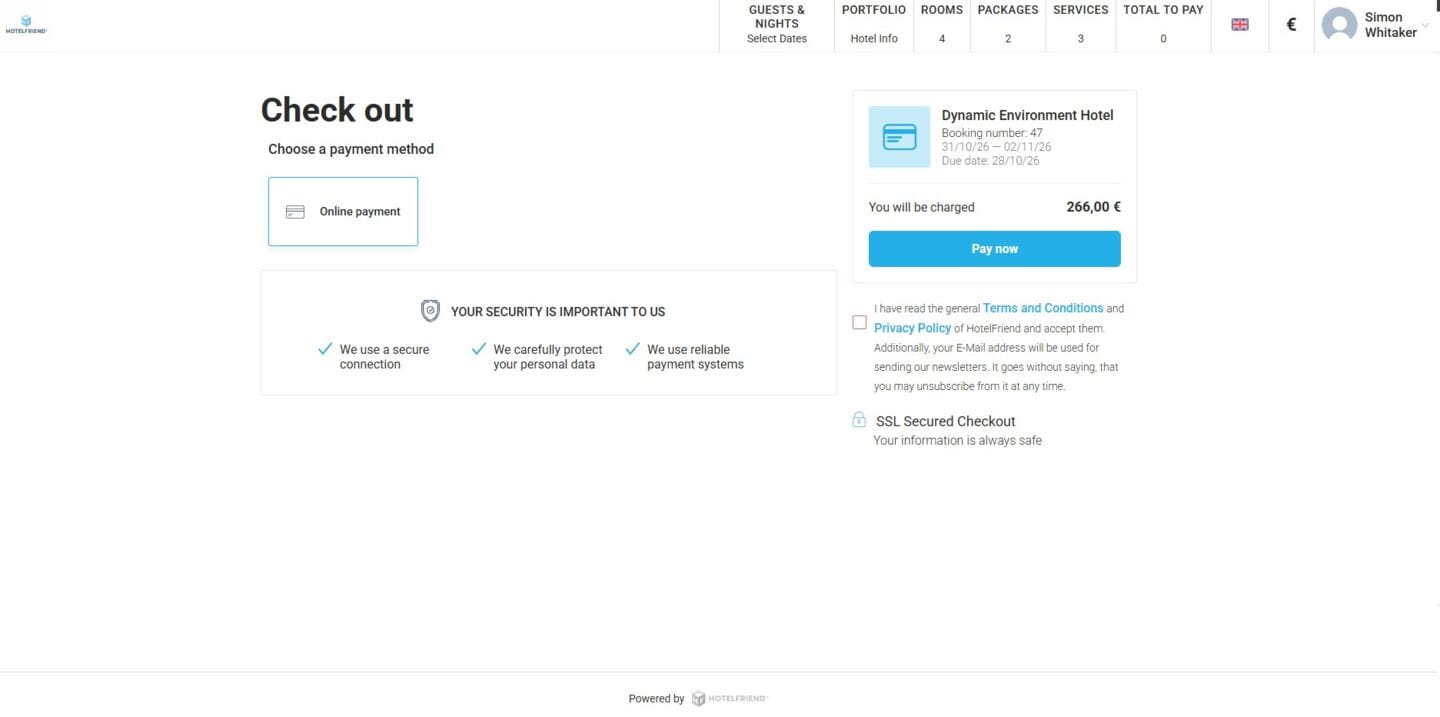
17. Scheduled Prepayments with Payment Links
No immediate charge, payment link when the installment is due.
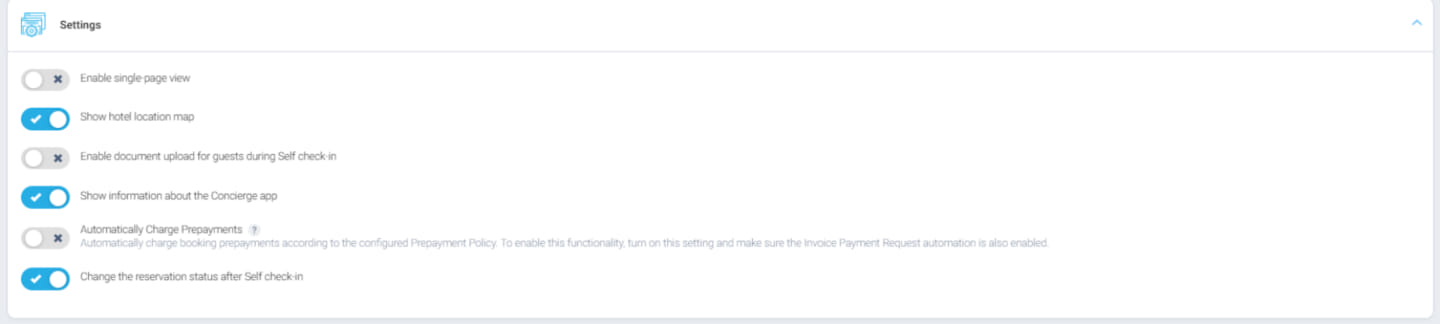
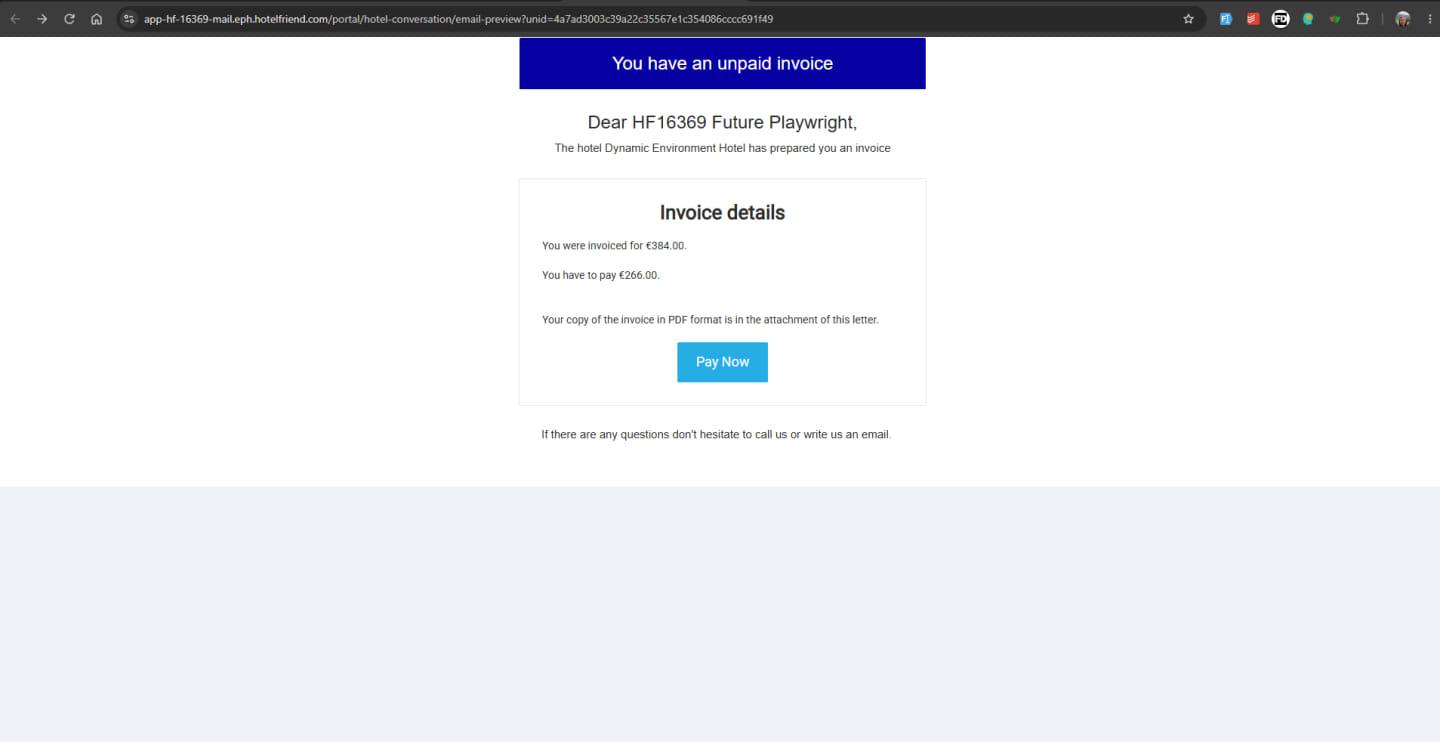
With “charge prepayment by schedule” mode, a booking made before the prepayment due date is no longer charged straight away. If the policy says “100 % 3 days before check-in”, the prepayment is scheduled on the invoice. On the due date, the payer receives the “Prepayment details” email with a link to pay exactly that installment via Adyen.
Where: Booking Engine → booking before the prepayment due date (mode enabled by support)
- The payment is booked to the reservation
- Hotels without this mode are not affected
Guests who book months ahead are charged when the policy says, not on the day they book.
18. Editable Payment Receipt Dates
The receipt date and time of a manually entered payment can be corrected at any time, even after the invoice was issued or the month was closed.
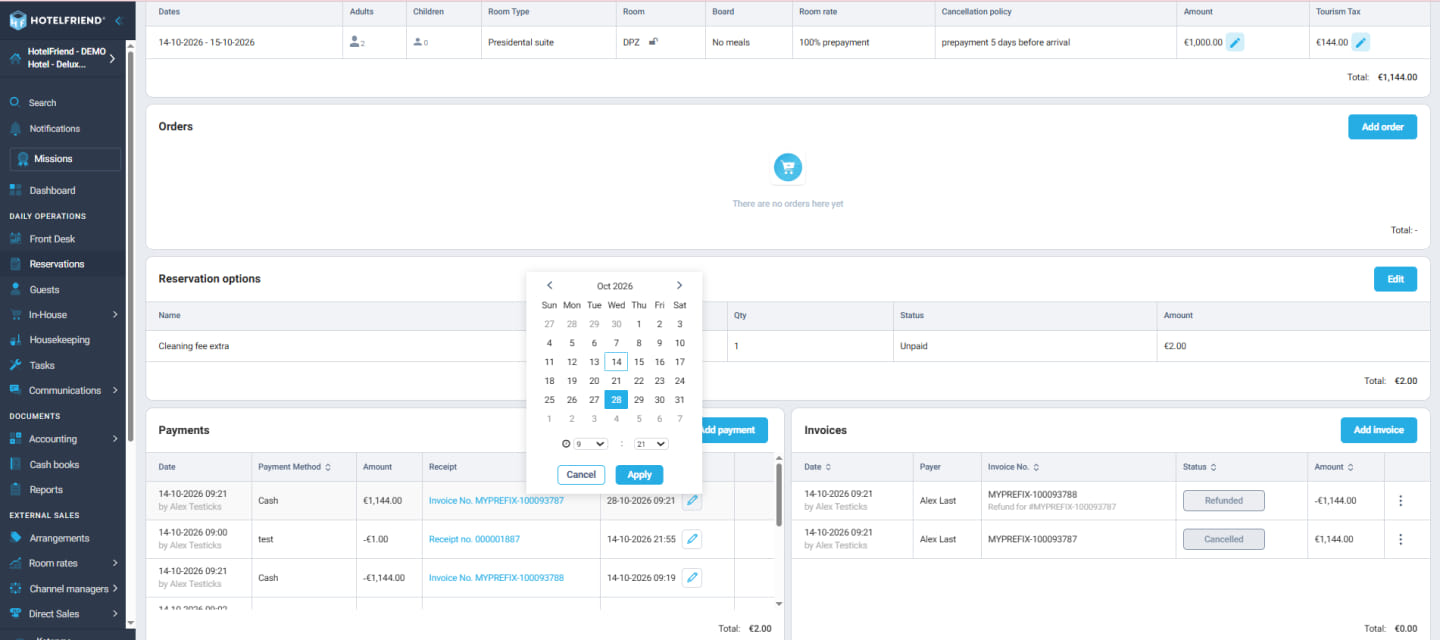
Where: Reservation card → payments grid · Accounting → Payments → payment details → Receipt day (pencil icon)
- Requires permission: Payment management. Without it the field is read-only
Reports and accounting exports can match the real receipt of the money, also in hindsight.
19. Improved Company Invoice Greetings
Company invoices no longer start with “Guten Tag ,”.
Invoices to a company, or for an order without a guest, used to open with an empty name and a dangling comma. The greeting now uses the company’s contact person, or the company name. If neither exists, no greeting is printed. Invoices for persons are unchanged.
Where: Accounting → Guests invoices → invoice for a company or without guest
In v4.39 and v4.40 Product Updates, guest sign-in and online booking become safer, families get correct meal prices, tax advisors receive invoices with their postings, and smart rooms follow real occupancy. Seminar hotels and campuses get a clearer overview of their resources, and accounting gets VAT per rate, scheduled prepayments and correctable payment dates.
Learn more about the System Explore Pricing
