Most hoteliers are running a leaner operation than the topline numbers suggest. The AHLA 2026 State of the Industry report projects hotel guest spending will reach nearly $805 billion in 2026, up 1.7% over 2025, while rising operating expenses are keeping gross operating profit per available room at roughly 90% of 2019 levels. The industry also paid close to $128 billion in wages and benefits in 2025, projected to approach $131 billion in 2026, even as margins stay under pressure (AHLA).
More revenue moving through the business without a matching gain in profit is exactly the squeeze that makes manual, disconnected operations so costly, and it's exactly what a connected stack of dashboards, workflow tools, and reporting software is built to relieve. Here's what that stack looks like in practice.
The Modern Hotel Operations Stack
Ask ten hoteliers what "automation" means, and you'll get ten different answers: a chatbot, a smart thermostat, a rate tool that adjusts overnight. All are right, and all miss the point. Today's hotel operations stack isn't a single piece of software. Instead, it's an interconnected set of systems: the PMS, channel manager, POS, housekeeping platform, guest messaging tools, and revenue management software, all functioning together as one unit.
In a well-connected setup, a reservation made through an external booking channel is transferred to the PMS, inventory is updated, the arrival appears on the housekeeping board, and the pre-arrival message is scheduled automatically. In a disconnected setup, an employee must complete each step manually.
What "Automation" Actually Means in Hospitality
The aim of automation is not to replace front desk staff or remove the human element from a guest's stay. Automated processes reduce repetitive, rules-based work so employees can spend their time where it counts: resolving a complaint, upselling a suite, or remembering a returning guest's preferences.
That includes:
- ● Syncing rates and inventory across OTAs, PMS systems, and your website to make sure that a booking on one platform instantly blocks the room on others.
- ● Automated communication with guests includes booking confirmation, sending check-in papers before arrival, and reminding customers about review requests once their stay is done, all of which takes place automatically.
- ● Automated housekeeping and maintenance that change the room status in real-time mode and direct the orders accordingly.
- ● Dynamic pricing that adjusts room rates according to occupancy, booking pace, demand, and predefined revenue rules.
The main idea remains: automation manages the processes of “if this happens, do that,” allowing employees to focus on exceptional cases and relationships. Properly used, it keeps a hotel from an overly mechanistic approach. Eventually, people working in a hotel are more capable of responding since they have less administrative routine.
Where Manual Work Costs You Most
The cost of manual work is not always visible as a separate line item, but it accumulates across several high-impact areas:
- ● Double bookings and rate mismatches from manually updating OTA extranets. A missed update costs a room night, plus staff time to fix it, plus guest trust.
- ● Front desk queues pile up due to the need for manual data entry at times of check-in and check-out.
- ● Housekeeping miscommunication happens because of the imperfection of information delivery through the switchboard or intercom.
- ● Delayed guest communication, where pre-arrival info, upsell offers, or feedback requests go out late or not at all because someone forgot or was off shift.
- ● Manual reporting, where staff spend hours weekly pulling numbers from disconnected systems into spreadsheets just to see occupancy, revenue, or labor costs clearly.
Individually, these inefficiencies may seem insignificant. Across a full year of operations, however, they consume staff time and revenue. Identifying where the hotel spends the most time on manual work helps determine what to automate first.
What Is the Best Real-Time Performance Dashboard for Hotel Management?
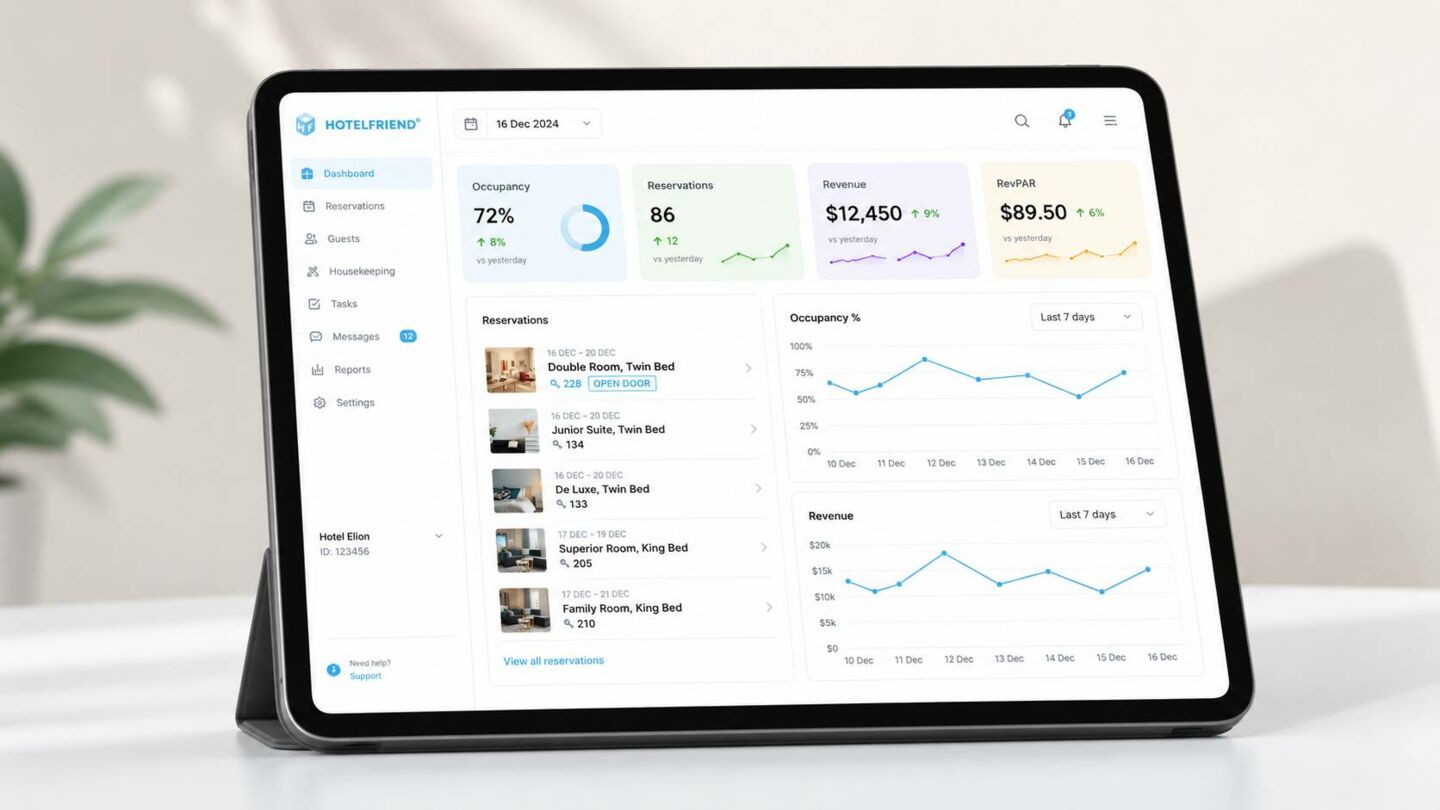
Monthly reporting presents organizations with what occurred. In contrast, dashboards give insight into what is currently happening, thereby providing managers with the ability to act while there is still time. In a business where occupancy changes hourly and slow check-ins result in upset guests, the difference between the two is crucial. Dashboards take data from PMS, POS, and more and allow managers to see problems occur and rectify them within the same shift rather than in the following month’s report.
Best Dashboards Showing Real-Time KPIs
Real-time dashboards give hotel teams a clear view of operational and financial performance as it changes throughout the day. The table below compares five platforms based on the KPIs they track, their reporting capabilities, and the types of properties they are best suited for.
| Solution | Real-Time KPIs and Data | Dashboard Features | Best For |
|---|---|---|---|
|
HotelFriend |
|
|
Hotels that want to monitor operations, revenue, payments, reservations, and guest activity within one platform |
|
Mews |
|
|
Hotels and hotel groups that need flexible performance reporting across multiple properties and departments |
|
Cloudbeds |
|
|
Independent hotels and growing portfolios that want operational, financial, and revenue data in one place |
|
SiteMinder |
|
|
Hotels focused on improving pricing, distribution, channel performance, and revenue management |
|
Oracle OPERA Cloud |
|
|
Hotels, resorts, and hotel groups that require detailed enterprise reporting and customizable dashboards |
KPIs That Should Be on Every Dashboard
Not every metric belongs on a live dashboard. The ones worth watching in real time are the ones that change fast enough to warrant same-day action:
- ● Occupancy rate: current, and against the same day last week or last year, to catch pacing issues early.
- ● ADR (average daily rate) and RevPAR: to see whether today's pricing is actually converting into revenue.
- ● Booking and pickup pace: number of rooms booked today for the upcoming dates.
- ● Check-in/check-out status: expected arrivals and departures versus completed check-ins and check-outs, so supervisors can assess the front desk workload.
- ● Housekeeping status: the status of the rooms – clean, dirty, or under maintenance.
- ● Cancellation/no-show rate: if the figure rises unnoticed, it can lead to significant financial losses.
- ● Guest satisfaction signals: live review scores or in-stay feedback, so a problem can be addressed before checkout, not after a bad review posts.
The goal isn't to track everything. It's to track the handful of numbers that, if they moved sharply today, someone on your team should know before the shift ends.
Can One Real-Time Operations Dashboard Cover Every Hotel Workflow?
An operational dashboard should give each team member the live view required for their role. Owners and GMs can compare revenue and occupancy with projections; front desk supervisors can monitor arrivals and departures; housekeepers can see room-status updates as soon as a room is ready for cleaning; and revenue managers can check pace, rates, and demand signals before the day is over.
The dashboard itself is not the important aspect; what counts is the actions that a team can take. This includes the following: closing a price gap ahead of the weekend rush, moving cleaning staff ahead of time to avoid a backlog in cleaning rooms, and contacting the customer before they leave a review as part of recovery efforts. A dashboard that is left open without any actions taken as a result is useless decoration.
What Are the Best Workflow Automation Tools for Hotels?
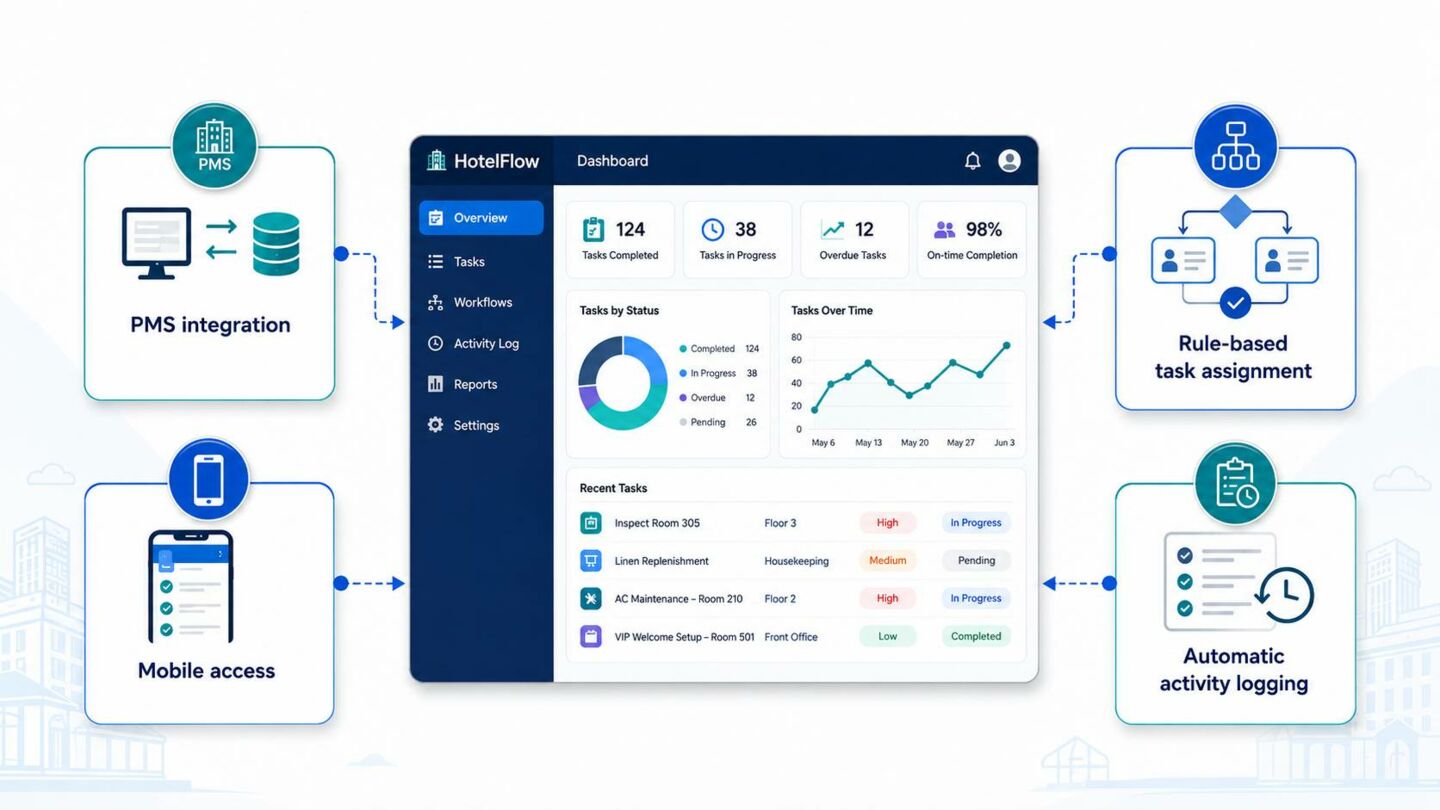
The right tool depends on property size and which departments feel the most strain, but the strongest platforms tend to score well on the same criteria:
- ● PMS connectors: when one system changes its status, processes in the other systems start, eliminating the need for repeating the same operation manually.
- ● Rule-based task assignment: work routes to the right person by role, location, or shift, not by a manager deciding by hand each time.
- ● Mobile capability: employees can receive, update, and complete operational tasks from the floor instead of returning to a desktop.
- ● Automatic logging of activity: all processes are recorded automatically in this service.

Do not consider only the feature list. Test how the tool handles exceptions, such as a rush of same-day arrivals, an urgent maintenance issue that takes a room out of service, or a task that must be reassigned during a shift.
Efficiency Gains from HotelFriend: Hotel Zur Kaiserpfalz Case
Hotel Zur Kaiserpfalz, a hotel and restaurant in Germany's Saale-Unstrut wine region, needed to run room bookings, restaurant service, and event operations without adding extra work for staff. Coordinating housekeeping, the kitchen, and maintenance used to mean manual updates and back-and-forth communication between departments.
After moving onto HotelFriend's connected platform, each department runs from the same system instead of separate tools and paper handoffs.
- ● Housekeeping. Tasks are distributed automatically through the Task Manager, so housekeeping always knows which rooms need cleaning, when early check-ins are expected, or where extra amenities are needed, without a phone call from the front desk.
- ● Maintenance. HotelFriend's maintenance module lets staff log plumbing, HVAC, and electrical issues from a mobile device and assign them directly to the responsible technician, keeping maintenance work in one system instead of relying on paper notes or verbal handovers at shift change.
- ● F&B. With the connection between the POS system and the PMS, employees can type their orders immediately from the table to the kitchen and charge it directly to the room of each guest.
- ● Results. With everything running through one connected system, Hotel Zur Kaiserpfalz cut manual accounting tasks by 70%, since payments from the front desk, restaurant, and online bookings now record automatically. Faster, more convenient booking and service also contributed to a 20% increase in guest satisfaction.

Which Systems Automate Hotel Reception and Bookings?
The front desk is often the busiest and most repetitive part of a hotel. Employees answer the same questions, check availability, send confirmations, verify guest details, collect payments, and coordinate arrivals every day. Automation can handle the predictable parts of this work while keeping employees available for guests who need personal assistance.
Systems to Automate Reception and Bookings
A combination of connected hotel tools can automate routine front desk and reservation tasks.
| Solution | What It Does |
|---|---|
|
Property Management System |
|
|
Channel Manager |
|
|
Booking Engine |
|
|
Automated Guest Messaging |
|
|
Digital Registration and Self Check-In |
|
|
Payment Automation |
|
|
Housekeeping and Task Management |
|
Payment rules should always match the hotel's booking terms, cancellation policy, payment provider, and applicable regulations. Pre-authorization can be useful for guaranteed reservations, but it should not be presented as a universal rule or a guaranteed way to eliminate no-shows.
Automating Front Desk End-to-End
Connected together, these systems support the hotel guest journey from the first inquiry through checkout:
- Inquiry. A guest visits the website, sends a message, or contacts the hotel. The booking engine or messaging tool provides current information and availability.
- Booking. The reservation is created in the PMS, inventory is updated, and connected sales channels receive the new availability.
- Confirmation. An automatic email or message confirms the stay and provides the applicable terms.
- Pre-arrival. Registration details, check-in instructions, payment requests, and optional upsell offers are sent according to configured rules.
- Arrival. Staff or a self-service flow verifies the reservation, room status, guest details, and payment status.
- Stay. Guest requests are routed to the appropriate department and recorded in the system.
- Checkout and follow-up. The folio is finalized, the room is released to housekeeping, and an eligible feedback request may be sent.
Automation should shorten queues and prevent repeated data entry, but hotels should retain a clear manual path for exceptions and for guests who need assistance.
Which Hotel Management Software Offers the Best Occupancy and Revenue Analytics Dashboards?
Every automated system in a business, from booking to check-in to billing, generates data. Left unused, that data is just noise. Turned into reporting and analytics, it becomes the clearest picture available of what's actually driving revenue, where operations are leaking time, and what to fix next.
What Are the Top Five Hotel Data Analytics Tools for Revenue Growth?
Hotel data analytics tools help teams understand performance, identify profitable booking channels, forecast demand, and make better pricing decisions. The table below compares five platforms based on their analytics features, revenue benefits, and the types of properties they serve best.
| Solution | Key Analytics Features | Reporting Functions | Revenue Benefits | Best For |
|---|---|---|---|---|
|
HotelFriend |
Real-time dashboards, financial data, booking-source analysis, and historical comparisons |
More than 20 report types, custom report builder, scheduled delivery, and flexible exports |
Identifies profitable channels, tracks revenue trends, and supports faster decisions |
Hotels seeking analytics and reporting within an all-in-one property management system |
|
Mews BI |
Occupancy, ADR, RevPAR, booking pickup, and segment analysis |
Prebuilt and custom dashboards, filters, exports, and scheduled email reports |
Reveals pricing and demand trends across properties and revenue streams |
Hotels and hotel groups using Mews |
|
Cloudbeds Insights |
Reservation, payment, occupancy, distribution, and market data |
Standard and custom reports, report folders, exports, subscriptions, and customizable dashboards |
Improves pricing, channel selection, forecasting, and revenue tracking |
Independent hotels and growing portfolios |
|
Duetto |
Demand forecasting, dynamic pricing, profitability analysis, and portfolio data |
Forecasting dashboards, custom reports, and centralized property and portfolio reporting |
Optimizes room rates and balances group and individual bookings |
Hotels, resorts, casinos, and multi-property groups |
|
Lighthouse |
Competitor rates, market demand, booking pace, benchmarking, and revenue data |
Custom reports and dashboards, scheduled exports, automated reporting, and AI-generated summaries |
Helps hotels respond to demand changes and identify revenue opportunities |
Properties focused on pricing and commercial intelligence |
HotelFriend brings operational and reporting data together within the same platform, which can reduce the need to reconcile separate systems. The exact dashboard, reporting, integration, and multi-property scope depends on the selected package and configuration, so hotels should confirm those details during the product evaluation.
Custom KPI Reporting
Custom KPI reporting lets hoteliers define and track the metrics that matter most to their property, rather than sorting through generic reports for relevant numbers. With HotelFriend, teams can build reports around KPIs such as:
- ● RevPAR (Revenue per Available Room): it measures the effectiveness of revenue generated from rooms.
- ● ADR (Average Daily Rate): pricing performance over time
- ● Occupancy rate: by property, room type, or season
- ● Booking source/channel performance: which OTAs, direct bookings, or agencies drive the most profitable stays
- ● Guest acquisition cost: cost to win a booking through each channel
- ● Length of stay trends: average and seasonal variation
- ● Cancellation and no-show rates: impact on forecasted revenue
- ● Upsell and ancillary revenue: spa, dining, and add-ons per guest
- ● Repeat guest rate: loyalty and retention performance
- ● Revenue by department: rooms, F&B, events, and other streams
Automated tools can generate and distribute recurring KPI reports as priorities change. This gives managers a consistent basis for pricing, staffing, distribution, and marketing decisions.
What Is the Best Sales Channel Optimization Software for Hotels?
Sales channel optimization combines visibility with control. The software gives hoteliers an overview of distribution channels, including OTAs, direct bookings, GDS, and wholesalers. Comparing booking value with commission and acquisition costs helps reveal each channel's actual profitability. Integrating the booking engine and channel manager keeps prices and availability synchronized, reducing manual work and the risk of overselling.
Software for Sales Channel Optimization
A broad distribution mix is only useful when hoteliers know which channels are profitable. Channel optimization software provides a consolidated view of OTAs, direct bookings, GDS, wholesalers, and corporate accounts, allowing hotels to compare commission costs, average booking value, cancellation rates, and guest spend.
With this visibility, hotels can adjust marketing budgets, rates, and distribution priorities before an underperforming channel quietly erodes margin.
Integration with Booking Engine & Channel Manager
Channel insights have limited value unless inventory, pricing, and availability stay synchronized. When the channel manager and booking engine are integrated, updates made in one place—such as taking a room out of service, changing a rate, or launching a promotion—can be distributed without a manual update in every connected channel.
This kind of integration solves several problems hotels face when systems operate separately:
- ● Real-time inventory updates: when a room is booked through one connected channel, the shared inventory is reduced across the others, substantially lowering the risk of overselling
- ● Unified pricing: a special price for a specific season or a special offer is applied simultaneously to all booking channels
- ● No manual re-entry: updates made once flow through automatically, cutting down on repetitive admin work and human error
- ● Quick reaction to demand: information regarding availability and pricing changes is transferred immediately to all booking channels, which allows the hotel to react to the booking demand
- ● Lower operational risk: with no lag between a decision and its effect across channels, hoteliers can expand their distribution mix with confidence
When the channel manager and booking engine function as a single connected system rather than as separate systems, hotels spend less time reconciling information and more time utilizing it, achieving the correct pricing and ensuring that their inventory is consistent over all their distribution channels.
Building Your Operations Automation Roadmap
90-Day Plan
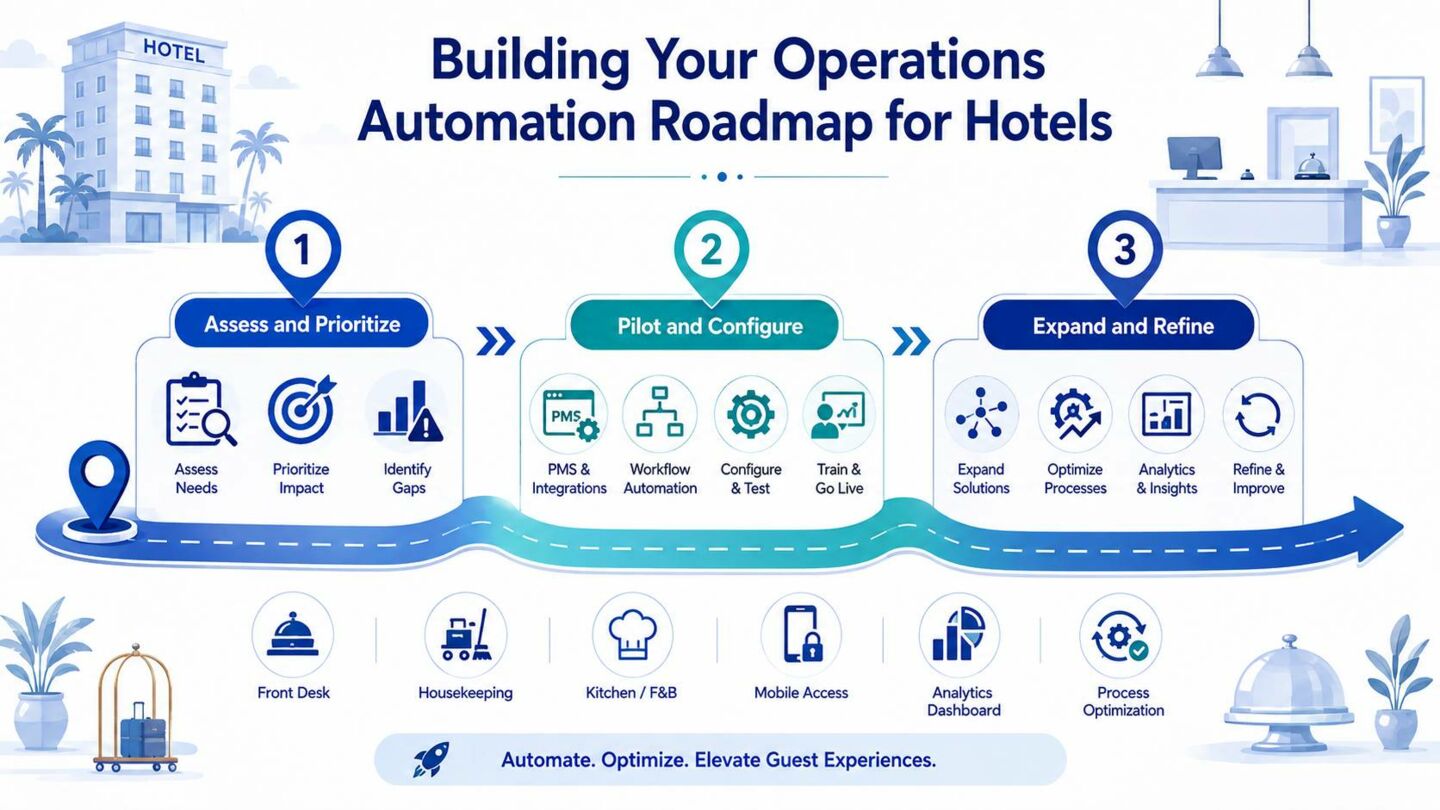
Rolling out automation works best in stages rather than all at once. Here's a practical 90-day approach to get started.
Days 1-30: Assess and Prioritize
- ● Map current workflows and identify where manual processes create the most friction, whether that's front desk check-in, housekeeping coordination, rate management, or reporting
- ● Involve staff from each department early, since they know where the real bottlenecks are
- ● Audit existing software and clarify integration needs
- ● Set clear, measurable goals for what automation should achieve (faster check-in times, fewer overbookings, reduced admin hours)
Days 31-60: Pilot and Configure
- ● Implement automation in one or two specific areas rather than across the entire property at once.
- ● Focus on high-impact steps, such as linking the booking engine to the channel manager, creating specific KPI reports, or automating guest messaging.
- ● Configure the systems and train the employees who will use them regularly.
- ● Monitor system performance closely and treat it as a trial phase rather than a full rollout, so problems can be caught and corrected early.
Days 61-90: Expand and Refine
- ● Extend successful automations to other functions using what the team learned from the pilot.
- ● Refine the workflows based on employee feedback and actual operating data.
- ● Roll out only the workflows that performed reliably during the pilot.
- ● Measure and document improvements against the original baseline.
- ● Create a prioritized plan for the next phase.
Pitfalls to Avoid
Even a well-planned rollout can stall if these common mistakes go unchecked:
- ● Over-automation: Implementing several systems at the same time makes it difficult to determine what is working and harder for employees to adapt.
- ● Ignoring frontline employees: Automation designed without their input often fails to address the real bottlenecks.
- ● Adopting disconnected tools: Adding software that does not integrate with existing systems recreates the same data silos.
- ● Insufficient training: Even the most well-designed automations fail to work if not used correctly.
- ● Not establishing success criteria: Without a baseline and measurable targets, it is difficult to determine whether automation works.
Conclusion
Hotel operations automation works best when it removes repetitive steps, connects reliable data, and gives employees more time for guests. Start with one costly workflow, define a measurable baseline, test the exceptions, and expand only after the pilot delivers a clear operational benefit.
Sources Referenced
- ● AHLA, 2026 State of the Industry: https://www.ahla.com/resource/2026-state-industry
- ● HotelFriend, Hotel Zur Kaiserpfalz case study: https://hotelfriend.com/b/hotel-zur-kaiserpfalz-case
- ● HotelFriend, hotel reporting and analytics: https://hotelfriend.com/blogpost/hotel-reporting-analytics-kpis
- ● Mews Business Intelligence: https://www.mews.com/en/products/mews-bi
- ● Cloudbeds Insights: https://www.cloudbeds.com/business-intelligence-software/
- ● Oracle OPERA Cloud Reporting and Analytics: https://www.oracle.com/hospitality/products/opera-reporting-analytics/